There is still miles to go to be done. Don't think it serves any purpose to hand out unfinished and smashed code. At least I have a tendensy to leave things hanging, and don't comment code before i am sure it is supposed to be that way for the rest of the project. Havn't seen wØØsys code yet, but I have a feeling it is not as pretty as he want it yet. But when it is done, I guess it will be free out in the open. At least everyitng I have done..
- ØØ -
Yeah my code is at that "lets hard-code this bit for the time being and make it dynamic later on when it works" stage
I did sort out all the namespaces before I sent it to Note so we should be fairly well structuresd in general. We currently have 3 projects in DoomSharp:
1: The Game
2: The Map Editor
3: The math stuff which is referenced by both Projects 1 and 2 because they both use some of the same classes.
I'm currently working on the editor and once I managed to match up the interface to the map class we'll be ready to start loading different maps at runtime by selecting them in a file dialog.
I'll be storing all the textures within the map files themselves, this will increase the file size of course but it will make things 10 times simpler and more stable, it'll decrease runtime file dependancy too. I'm predicting complex maps to be around 2 megabytes on disc.
well you could try rendering at half or 1.5 of the size of the screen and then use GDI+ to display it larger, depending how much time that takes, be a bit fuzzy though
I hope you were joking about the small screen thing
AntRush - Real-Time Strategy game, based around ants!
well you could try rendering at half or 1.5 of the size of the screen and then use GDI+ to display it larger, depending how much time that takes, be a bit fuzzy though
It would look rubbish and it would be even slower to expand the image at runtime.
Originally Posted by Phill64
I hope you were joking about the small screen thing
- Contains a 25x25 MapCube array (unused elements will remain null to save space in file (wouldn't be much anyway);
- Contains all texture bitmaps, could be a mixture of image sizes and color depths.
- Provides a single method for extracting all wallparts from all the cubes in one go (returns an array of wallparts in no particular order) this will be called one time only probably by the 3d engine at startup. The textures will be extracted in a similar way and passed to TexEng.
Map Editor program:
- All map data will remain within the DoomSharpMap object at all times.
- Previews of each cube will be available in the editor in 3D.
Ideas:
- drag & drop to replicate similar cubes (make corridors faster to design, use .Clone() to copy them, may need to implement ICloneable)
- rotate a cube by 90 degrees? (around the Y axis only, could be done simply by rotating the values in the last 4 elements of texture index array )
Code:
THINKING:
To rotate a cube north-->west (90 degrees anti-clock  (shift + left click)) do this:
int temp = tex[2];
tex[2] = tex[3];
tex[3] = tex[4];
tex[4] = tex[5];
tex[5] = temp;

To rotate the other way clockwise (shift + right click):
int temp = tex[5];
tex[5] = tex[4];
tex[4] = tex[3];
tex[3] = tex[2];
tex[2] = temp;
not sure if u guys know this (i didnt read through all 7 pages of posts) but if it helps for any reference, they did release original doom source code. You can download it here, it may help with some of the logic if you get stuck...
I'll take a look tonight. Doubt I'll understand these hallowed scriptures though. Rumour has it that the Doom Source was originally carved on 2 stone tablets on Mt Sinai.
Yeah, Both Doom 1 and 2 code is released. And Quake 1, 2 and 3 too. But it is hell to try to find anything in there....not commented at all, and they are hacking eveything they can hack..
yeah i have to imagine lots of games get hacks here and there just to "make stuff work" I found a website that a guy had posted a lot of the comments from the original half-life source code that was released to the MOD community. The comments were funny as hell and even displayed the primitive AI in the game (although to credit it, it is like 7-8 years old now)
comments were like
//this is the ugliest hack I have ever seen, how does this even work?
or
//enemy grunts, looks left, fires once, ducks, fires 2 more times
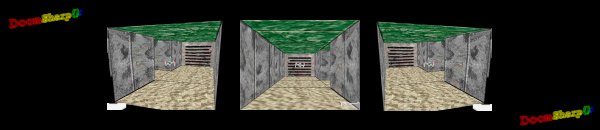
Why is there a TIE fighter flying around in your maze?
I like it though.
Hehe, yeah it does look like that
OK, sneak preview of the map editor...
The blue line shows the dragdrop from the listview into the small black pictureboxes, this assigns that particular texture to that side of the current cube. The letters on the pictureboxes show you which wallpart on the cube we are talking about (C=ceiling, f=floor, NESW = north, east, south, west).
The 3d preview isn't up yet, maybe tomorrow. Also nothing else currently works, not even the dragdrop but I need to research that. I think kleinma has done some dragdrop on VBF somewhere, if anyone has a link I'd be much obliged.
Last edited by wossname; Aug 22nd, 2005 at 04:08 PM.
aren't you going to need a 3d map editor? that looks a little more like a 2d tile based editor..., not that I am an expert on map making, but I have used the CS:S/HL2 hammer program, and while the top down view looks sort of like that, they also have a side view, and a 3d view, how else would you specify object heights or build stairs, etc...
All our maps will be on flat ground and all the cubes will be the same shape and size (currently 2 metres on a side but can be scaled easily). Truth be told this will be more like Castle Wolfenstein than Doom, map-wise. Orthogonal rooms and corridors. The 3d area will let you look at a single cube in perspective in order to get the decor to [camp]coordinate[/camp] (make sure the curtains match the wallpaper so to speak).
Kleinma, do you know how to drag and drop from a listview to a picturebox? (I need to drag the listview's SelectedIndex value as an integer into the picturebox so I can load the corresponding image.
sure ill work up an example for u in a little bit...
lol i understand its not supposed to be super advanced or anything.. but in that case you will have no objects... even Wolfenstein had tables and beds and things that were built into the map... not saying you need to have it.. just sort of the thing you would need to think about before coding the engine..
sure ill work up an example for u in a little bit...
lol i understand its not supposed to be super advanced or anything.. but in that case you will have no objects... even Wolfenstein had tables and beds and things that were built into the map... not saying you need to have it.. just sort of the thing you would need to think about before coding the engine..
Just wait untill you see our billboards...
PS: I have (didn't mean too) optimized the camera class 2 and a half inch.....
PS: I have (didn't mean too) optimized the camera class 2 and a half inch.....
Hmm, which version your old one or my new one? Does this mean you finally have C# 2005?
I need to know where you're at.
I'll update you with my latest version as soon as I finish the editor.
PS. We won't have any problems inserting special objects into the maps, anything that can be made out of wallparts can be used. This will be a job for MUCH later though.
And I do eat and do other stuff during those two hours..
Well stop it! You're just not committed to the project, food and sleep are for the weak. I haven't eaten solid food since we started, I've had my stomach replaced with a beer filter to capture all the nutrients.
here the hell do you go the rest of the time? Pulling 90 hour weeks at CERN??
December I think. The book goes to press in Nov so it's after then. I'm too lazy to go to MS.com to find out.
OK, well depends on how much stuff you want into it. But just the basic drawing should be done way before Dec......before the MVP awards.....hehe..just kidding..
W0o0t, I have done teh code to draw each cube on the editor map layout.
Orange tracks mean thats where the player can walk through, black lines indicate wallparts. The 2 red circles show that the central cube nas neither a floor or ceiling assigned to it (the upper circle meaning the ceiling of course).
I'll probably shade the floor with either a shrunken version of the chosen texture or just a plain grey color because the texture might make it hard to look at.
(*Transparent texture maybe?*)
If 2 adjacent cubes have a wall between then then we ned to tell both cubes that the wall is there, so it can be seen from both sides, the east side of the central cube on this image shows a double wall because the player is allowed to be on either side of that wall if he wants. (If we only had one wall then it would be invisible from one side due to anticlockwise culling).
Last edited by wossname; Aug 23rd, 2005 at 07:38 AM.


...but for now it looks at least not that bad..


 Originally Posted by NoteMe


 ...hehe....I loved your comment about DX and JR in CC...
 Multi-Clipboard


