Results 1 to 2 of 2

Thread: How to create dynamic form using mysql and php?

  1. #1

    Thread Starter
    Frenzied Member
    Join Date
    Apr 2005
    Posts
    1,907

    Arrow How to create dynamic form using mysql and php?

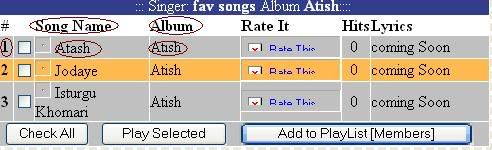
    Hi all . i wonder how i can creating a dynamic form by pulling its data such as songid,songname,album from mysql db and creating a form like below. For each record in db one row in the form.I wrote part of the code but i do not know how to print the form with right information on it.The bold parts are the dynamic values and assume all data are in one table.Could any expert help me wth this part.Thanks


    dynamic form code:
    Code:
    <?
    $username="username";
    $password="password";
    $database="your_database";


    mysql_connect(localhost,$username,$password);
    @mysql_select_db($database) or die( "Unable to select database");
    
    $query = "select songno,songname,songalbum from musictable)";
    mysql_query($query);
    
    mysql_close();
    ?>

    part of the code that for form .The bold part are pulled from db.
    Code:
    <tr>
                            <td bgcolor="#C0C0C0"><p align="center"><b>1</b></p>
                            </td>
                            <td bgcolor="#C0C0C0"><input
                            type="checkbox" name="Id" value="1"></td>
                            <td bgcolor="#C0C0C0"><a
                            href="javascript:newWindow('./player/ram4.php?sid=1')"><img
                            src="images/Speaker.gif"
                            alt="Listen to this Song" border="0"
                            width="16" height="16"
                            longdesc="Listen to this Song"></a>&nbsp;Atash
                            </td>
                            <td bgcolor="#C0C0C0">Atish</td>
                            <td bgcolor="#C0C0C0"><a
                            href="javascript:newWindow('RateSong.asp?SongID=1')"><img
                            src="images/RatIt.gif"
                            alt="Rate This Song" border="0"
                            width="100" height="22"
                            longdesc="Rate This Song"></a></td>
                            <td align="center" bgcolor="#C0C0C0">0&nbsp;</td>
                            <td bgcolor="#C0C0C0">coming Soon <!-- <a href="../site.php?songID=1&Song=Atash">Read </a>| <a href="../Members/WriteLyrics.php?SongId=1&Song=Atash">Write</a> --> </td>
  2. #2
    Fanatic Member neicedover1982's Avatar
    Join Date
    Jun 2005
    Posts
    566

    Re: How to create dynamic form using mysql and php?

    I am going to use code from my website but you can easily change it.

    Since your pretty much ar grabbing every entry in the database you need to loop through the results line by line and write them out. What this is doing is grabbing each entry (the title in your mysql database) and assigning it to a varaiable. 'Name' is the colum name in your database
    PHP Code:
    while ($row mysql_fetch_array($result)) {
        
    $Name=$row['Name'];
        
    $Date=$row['Date'];
        
    $Online=$row['Online'];
        
    $Banner=$row['Banner'];
        
    $Type=$row['Type'];
        
    $Version=$row['Version'];
        
    $Downloads=$row['Downloads']; 
    next you need to write the stuff that will be displayed on the screen. make sure you have ".=" so you dont just over write tyhe varaible but add to it. Since you want a new row every time you start and end with the <tr>.
    PHP Code:
    $programListings .= "
        <tr>
        <td align='center' valign='middle' width='400'>
        <a href='program_data.php?programname=
    $Name'>
        <img src='
    $Banner' width='392' height='72' border='0'>
        </a><br>
        <font class=title><strong>Name:</strong> 
    $Name</font>
        </td>
        <td align='left' valign='middle'>
        <strong>Version:</strong> 
    $Version<br>
        <strong>Date:</strong> 
    $Date<br>
        <strong>Downloads:</strong> 
    $Downloads<br>
        <strong>Link:</strong> <a href='program_data.php?programname=
    $Name'>Visit Here</a>
        </td>
        </tr>
        "

    Make sure to close with a "}" tag. then where you want to put the code in your html write this line.
    PHP Code:
    <table border="1" cellpadding="1" cellspacing="1">
    <tr>
    <td>Heading 1</td>
    <td>Heading 2</td>
    <td>Heading 3</td>
    <td>Heading 4</td>
    </tr>
    <?php echo $programListings?>
    </table>
    this will write out the data from your database one line at a time. and add it to the table to be written. if you want, http://visualbasic.moonsofneptune.com/ this code is dynamically taking from the databse the list of my programs and info and writing it out in the table. its a little different format but you can just modify the table layout to fit. if you have any other questions just ask.
    Kevin | New England Iced Over | http://www.kevincawleyjr.com

Posting Permissions

  • You may not post new threads
  • You may not post replies
  • You may not post attachments
  • You may not edit your posts
  •  


Click Here to Expand Forum to Full Width